NeuroLogic: Natus & Persyst
Natus & Persyst Instructions
Natus Instructions
Launch & Log In
Power on the workstation, launch the Natus NeuroWorks app, and log in with your secure credentials.

Open Patient Study
Navigate to the Patient Studies list or use the search function to locate a record. Then select the desired EEG study. Confirm two patient identifiers, study date, and recording start time before interpreting or reporting.

Configure Display
Select the bipolar montage Bipolar LT over RT and begin with display sensitivity 7 μV/mm, time base 30 mm/sec, HFF 70 Hz, and LFF 1 Hz. These are starting display settings, not fixed interpretation settings; adjust the montage, sensitivity, time base, and filters to answer the clinical question while avoiding waveform distortion. See the same knobs on a 10-second page in EEG Fundamentals.

Calibrate the Screen
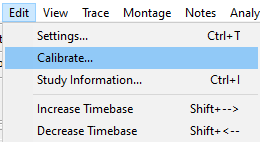
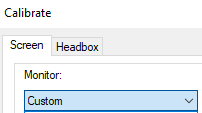
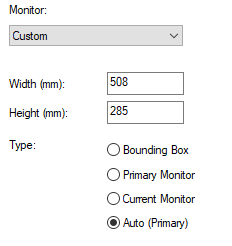
Go to Edit → Calibrate… On the Screen tab, set Monitor to Custom and enter the screen dimensions in millimeters using the actual measured display area, not a copied example value. Set Type to Auto (Primary), then click Apply. Calibration makes the on-screen millimeter scale physically accurate, so sensitivity (μV/mm) and time base (mm/sec) mean what they say.
Analyze the EEG
Read the raw EEG systematically: background, symmetry and reactivity, sleep features, artifacts, interictal abnormalities, and events. Change montage to check a suspected field; use video and ECG to test artifact explanations. Measure frequency and duration before assigning a pattern name.
Annotate Events
Place event markers by clicking the designated buttons at the top of the screen.

Create EEG Report
After review, open Epic's reporting interface, generate a new report, and pend the note for review.
Template Types (EPIC Smart Phrases)
These smartphrases are institution-specific — they exist in this institution's Epic build and will not be available at other sites.
| Smartphrase | Use |
|---|---|
2026VEEG |
Standard VEEG (w/ prior routine in 6mo) |
2026VEEGNEONATAL |
Neonate VEEG |
2026EMUVEEG |
ALL EMU admissions (Kravis, MSH, MSW) |
2026BASELINE VEEG |
New hookup without prior routine. |
2026SAHBASELINE... |
Subarachnoid Hemorrhage (Alpha/Delta ratio) |
2026INTRACRANIAL... |
Intracranial studies (Know electrode locations!) |
2026AMBULATORY |
Prolonged outpatient studies |